
Why WordPress?
WordPress is a really good platform to use because you can make a blog and upload it to the site and the site is free which is good for everyone, and when you upload it to the site other people around the world can see your blogs and depending on your type of blogs it could help many people depending on what you write about.
Example, I’ve been writing blogs on my progression on coding and I’ve been adding little step by steps and that could help many people to learn basic of coding just like me.
‘Programming for the Visual Art with Processing’
We’ve got to create a code of traffic lights and make them change colours in order, with pressing the mouse or moving it.
I’ve found this code online so it’s not my code, I’ve changed some of the coding to make it like my own.
This picture (below) is the code before I changed anything in the code.

‘Research’
I used google to find out the difference between UK traffic lights and the USA traffic lights. (UK on the left and USA in the right).


‘Reason why I chosen the style of traffic lights’
I’ve chosen the UK style of traffic lights because it’s the same as the UK and that’s what I’m used to on the road and the same as the light shape which is a circle, so I tried to copy the same style and the same colour and colour change order.
When I first done the code and changed a few things the only way the colours would change is if you move the mouse over the circles. (pictures below)
‘Information’
Chris sent us all a code to try and help us out to make the colours change by pressing the mouse not going over it.

After doing a lot of tweaking on the code con binding the code I found online as the code Chris sent to us, I managed to get the traffic lights to change colour when clicking the mouse.
After the tweaking this is the result with the colours. (picture below) I chose these colours because they’re not too bright and not too dim, they’re easy for other people to see and not have a problem.
This is my completed code after all the tweaking around(code below)
int counter =0;
void setup() {
size(700,450);
smooth();
};
void draw() {
background(255);
//These codes make the shapes for the traffic lights.
rectMode(CENTER);
ellipseMode(CENTER);
fill(#000000);
//rect is the shape of the traffic lights.
rect(350,225,125,275);
//These are the circles for the trafficlights
fill(255,0,0,50);
ellipse(350,140,75,75);
fill(255,240,0,50);
ellipse(350,225,75,75);
fill(0,255,0,50);
ellipse(350,310,75,75);
//These are the colours for the lights, counter==1 is the first click and colour.
if (counter ==1) {
fill(255,0,0);
ellipse(350,140,75,75);
}
else if (counter ==2) {
fill(255,240,0);
ellipse(350,225,75,75);
}
else if (counter ==3) {
fill(0,255,0);
ellipse(350,310,75,75);
}
}
void keyPressed() {
counter=counter+1;
}
‘Programming with Python’
Chris gave us a task using python, we had to make the program say the colours of the traffic lights and in order as they are, red,amber,green.
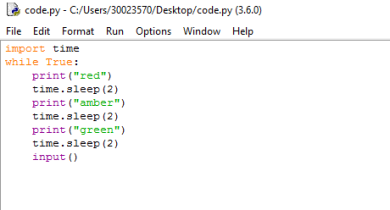

This is the code I’ve used for python, I’ve added seconds in-between the colours so that it takes 2 seconds to change colour.
I’ve also added the code input() so when you press the “Enter” key it will stop the code from repeating the code over and over.
We’re trying to make the text ‘red,amber and green’ to change the name colours, I’ve manged to change the text but only to one colour and that’s red(picture below) but I’ve done some research but not found anything yet.

‘Task 4a’
In task 4a we’ve got to make a code in python that produces a counter that counts from 0 to 10, with a 0.5 second delay.
Here’s my code for the counter that I’ve created so far. (picture below)

And this is the code after you run it. (picture below) It shows that it has counted from 0 to 10.

After making sure everything is working I added some text to make the code more understanding for others, it will help people that are starting python coding just like me.

I went through the code again and I decided to change to time.sleep time from (0.5) to (1.5) because it was changing numbers too fast so I slowed it down a little.(picture below)

‘Task 4b’
After changing a couple of coding we had to add the word ‘LIFT OFF’ into the code so when the counter gets to ten its says ‘LIFT OFF’.(picture below)

And now this is the code when you run it.(picture below)

Now I’ve done adding the word ‘LIFT OFF’ I then saved the code as ‘task 4b.py (picture below)

‘Task 4c’
Now I finished all off that I now have to modify the code so it prints the 5 times table(picture below).

This is what the code looks like when the code is working (picture below)

Now I saved the code named as ‘task 4c.py’ (picture below)

After talking to Chris and showing him my code for the 5 times table he showed me an easier way to do it. (picture below)
The text all in green at the bottom is my code and the top is the code that Chris helped. This code is better then mine because if I wanted the 7 times tables I would have to edit all of the code where as Chris code you just change the number from 5 to 7 and it will show you the 7 times table, this way it will save you a lot of time and it’s a lot less coding too.

‘Task 4d’
We’ve got to make a code where it asks the user to enter a message. Then this message is printed 3 times, with 1 second delay and then save the code as ‘task 4d.py’ (picture of code below)

When you run the code it should say ‘what is your name?’ and when you type in your name is should repeat your name 3 times.( picture below )
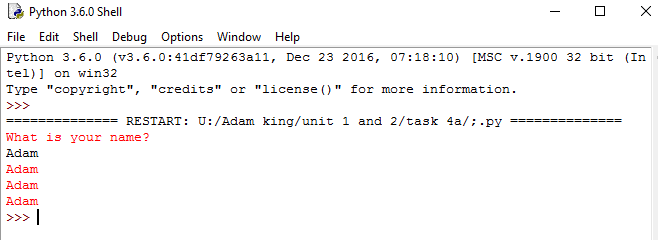
Now we have to save the program as ‘task 4d.py’ (picture below) I saved it into my folder called unit 1 and 2.

We now got to make a code in a program of our choice, between idle or processing. We’ve to develop a program to help kids with their alphabet and simple words like ‘cat’. I’ve spoken to Chris and he’s helped me a little with the code (picture below) to get started.

I have created a code that says an item or something in order if the alphabet. (picture below) there are two screen shots, one of the code with some of the words and the other picture is the code when you run it.


And this picture (below) is another example of a word when you click through the alphabet.

I went into more detail and added a picture as a background and at the start I added text saying “Click to see the alphabet” all of the information will be on the picture below.

And I’ve made it so the background carries all the way through the alphabet. (picture below)

I made the text for the start of the program bigger so its easier to see and read. (picture below)

‘Capital Cities Of Countries’
Now we’ve to make a program to teach people the capital of countries, we’ve to document our progress which I’ll be doing down below.
Here’s my code for the capital of countries (picture below) I’ve put the countries in alphabetical order.

I added a picture of the world through out the code because the program is based on countries around the world (picture below)

The text was small and out of place so I rearranged it and now it looks like this (picture above)
I chosen this picture (above) because it has a white background and the world is light grey so it’s easy to put black text over the top.
I had an idea for every country I clicked on it would highlight that country on the map picture but that idea is for the future for me.
‘Quiz’
Now we’ve to put our program into a quiz so we can test the peoples knowledge that used the program.
Here’s part of my code that I’ve created after talking with Chris (picture below)

As you can see it has the questions for the capital of a country so when you run the program it will come up as questions and it will give you three options to choose from. (picture below)

If you get the question correct it will continue to the next question but if you get it wrong it will say ‘Unfortunately , that’s wrong. The correct answer is’ (picture below) And it will go on till the last answer.

‘Arrays’
Arrays can be used to get information you stored, if there’s a word in ” ” then it will treat it as a word but if you don’t use ” ” then the program will treat it as a number.
The ” ” are called strings because the word is hanging onto ” ” .
Here’s a picture of my code so far, with all the names. (picture below) and also you see the result when you run the code.

After completing this list we had to modify it to only show the first and fifth names in the array (list) Here’s what my code looks like now and what it looks like when you run it (picture below).

 I’ve now saved my program code as task7b.py in my unit 1 and 2 folder so I know everything is safe and in their correct folder (picture below).

I added a code in where when you run the code it only shows the two names you have chosen (picture below)

This is what will show when you run the code (picture below).

I then went abit further and added a code call ‘radndom.choice’ when you use this code its picks random names from the students area. (picture below)
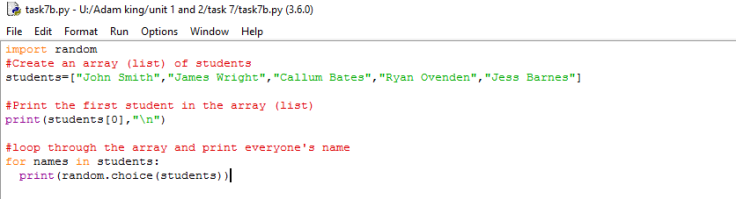
Then when you run the code it choices random names (picture below).

‘Task 7d’
Now the next task is to create a program with a menu storing 10 types of fruit in an array. We had to add an option for when a user presses “A” then all types of fruit will display.
I’ve done research online and got help to write this code because I had no idea how to do it, this is my code so far (picture below) I still need to do more to it. I’ve got it so it comes up “Please enter a letter” then “You have selected A, The list will now be displayed” but the list don’t display.


After trying to get the code to work I restarted the code and then got some help from Jacob, I typed up the code and this is the result of my code (picture below)
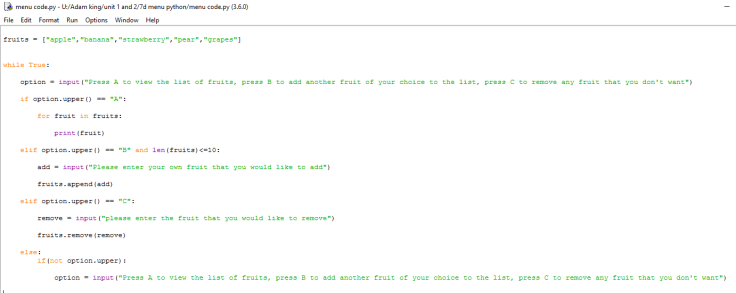
And now when I run the code it now comes up with “Press A to view the list of fruits, press B to add another fruit of your choice to the list, press C to remove any fruit that you don’t want” and if you enter A it will show you the list of fruits (picture below)

Now there’s two options, one to add another fruit or the other is to remove any fruit. I will go with option two next and add another fruit calling it “Apricots” (picture below)

As you see I type in B to add in a new fruit and I added Apricots and it came up to press A to show the list so I did and the fruit “Apricots” that I added is now there in the list with the other fruits.
The second option is to remove any fruit from the list, I’m going to remove the fruit I just added “Apricots” (picture below)

You can now see I typed in C to remove any fruit from the list and I removed “Apricots” and after removing it I typed in A to view the list of fruits and now “Apricots” is now gone.
I’ve now completed the code but now need to add some comments in the code to make it better to understand and read the code for me and for other people that need help with the same code. I’ve added some comments into the code and this is the end result (picture below)

I’ve now saved the code under the name “task.7d.py” (picture below)
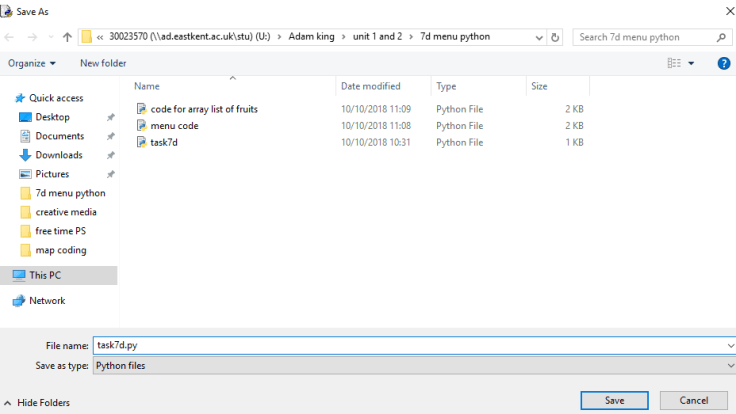
I think my python coding has improved a little bit by finding out ways to add lists,adding words to the list and removing words.
‘Using the map() function’
Friday 5th October 2018
Chris gave us an example of the function map() code and we had to make colours change when the mouse is moved across the canvas and using the code map, m and p. Here’s an example of the code (picture below)
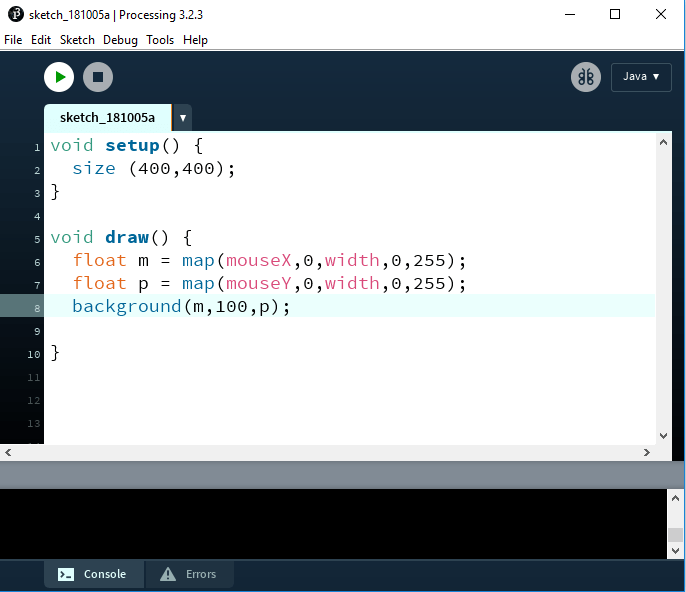
When we run the code it will show one colour at first but when we move the mouse across it will change to different colours. (I will leave three screen shots of the start, middle and end, below)


After creating the code Chris had giving us a task to add a picture into the code and when we move the mouse across the picture that we added will take over the colour (pictures below of code and picture/colour)


This is the full code for the function map() and using a picture, this might help someone that don’t know how to use any of these codes/functions. (picture below)

7d task 9
Your task is to create a piece of creative media to celebrate the life and works of Ada Lovelace (Ada Lovelace Day was on 9/10/18). Firstly, you are to conduct research on Ada Lovelace and document this in WordPress. You are then to draw / articulate a plan for the piece of creative media you will create to celebrate her life, works and achievements. This could be a poster, created in Photoshop but should ideally be something created in Processing. It should be performative, expressive and/or interactive. The next part of your research is to look at similar pieces of creative media and get / develop ideas from these. For example, look at posters about Ada Lovelace and pick out features / colours you like. Post all your thoughts and ideas to WordPress. Then, using your ideas and research, create your piece of creative media. Afterwards, test it and get feedback from users. This task, if done properly, will take 2-3 sessions (maybe even the whole day). Treat it as a ‘mini-project’
Who is Ada Lovelace?

Research from Wikipedia
Ada Lovelace was an English mathematician and writer, she was known for her work on Charles Babbage’s proposed mechanical general-purpose computer and the Analytical Engine. She was the first to recognize that the machine had applications beyond pure calculation, and published the first algorithm intended to be carried out by such a machine. As a result she is sometimes regarded as the first to recognize the full potential of a “computing machine” and the first computer programmer
Research from findingada.com
Ada Lovelace was most often known as ‘Ada Lovelace’ she was born in Ada Gordon in 1815, sole child of the brief and tempestuous marriage of the erratic poet George Gordon, Lord Byron, and his mathematics-loving wife Annabelle Milbanke.
At the age of 19 she was married to an aristocrat, William King; when King was made Earl of Lovelace in 1838 his wife became Lady Ada King, Countess of Lovelace. She is generally called Ada Lovelace, which is a little incorrect but saves confusion!
Research from http://www.computerhistory.org
Ada Lovelace (1815-1852) was born in Augusta Ada Byron, the only legitimate child of Annabella Milbanke and the poet Lord Byron. Her mother, Lady Byron, had mathematical training (Byron called her his ‘Princess of Parallelograms’) and insisted that Ada, who was tutored privately, study mathematics too – an unusual education for a woman.
Ada met Babbage at a party in 1833 when she was seventeen and was entranced when Babbage demonstrated the small working section of the Engine to her. She intermitted her mathematical studies for marriage and motherhood but resumed when domestic duties allowed. In 1843 she published a translation from the French of an article on the Analytical Engine by an Italian engineer, Luigi Menabrea, to which Ada added extensive notes of her own. The Notes included the first published description of a stepwise sequence of operations for solving certain mathematical problems and Ada is often referred to as ‘the first programmer’. The collaboration with Babbage was close and biographers debate the extent and originality of Ada’s contribution.
I went on to do some research on Ada Lovelace and I went onto three different sites to get all the information on Ada Lovelace that I need, the first site was the main site everyone knows which is Wikipedia, the second site was findingada.com and the last site was called computerhistory.org.
Collecting all the information this is what I have.
Ada Lovelace
(This is in my own words getting all the information from above)
Ada Love born in 1815-1852 is mostly known for her work on Charles Babbage’s proposed mechanical general-purpose computer and the Analytical Engine. She was the first to recognize that the machine had pure calculation and she published the first algorithm intended to be carried out by such a machine. As a result she is sometimes regarded as the first to recognize the full potential of a “computing machine” and the first computer programmer.
This is Ada Lovelaces first program all planed out on paper (Picture below)

In 1842, Ada Lovelace Wrote the World’s First Computer Program. Today I found out that Ada Lovelace was the world’s first computer programmer all the way back in the mid- 1800s, writing the world’s first computer program in 1842
Ada facts:
- Half of Charles Babbage’s brain is preserved at the Hunterian Museum in London. No word on what happened to the other half.
- The programming language “Ada”, which is the “official” programming language of the United States military, was named after Ada Lovelace; the military standard for the language, “MIL-STD-1815” was given the number of the year of her birth.
- Annoyed by an “inaccuracy” in the poem “The Vision of Sin”, Charles Babbage wrote to the famed poet Alfred Tennyson requesting that he change the lines “Every moment dies a man, Every moment one is born” to “Every moment dies a man, Every moment 1 1/16 is born”.
- Ada Lovelace’s image can be seen on the Microsoft product authenticity hologram stickers.
This is a picture of An original model of part of the Analytical Engine. Photograph by Bruno Barral (ByB) (picture below)

I was talking to Matt about my idea for Ada Lovelace and we spoke about the past, present and future, Ada is the main reason for everything in technology is like it is now because everything is computer based and if she didn’t create the first computer who knows what we would be use now to type this blog up with.
My idea is to create a poster based on Ada and her brain, Matt mentioned about the old b movies from the 1950’s and I got the idea from the posters.

Research was from wikipedia.
The 1950s mark a significant change in the definition of the B movie. The transformation of the film industry due to court rulings that brought an end to many long-standing distribution practices as well as the challenge of television led to major changes in U.S. cinema at the exhibition level. These shifts signaled the eventual demise of the double feature that had defined much of the American movie going experience during Hollywood’s Golden Age of the 1930s and 1940s. Even as the traditional bottom-of-the-bill second feature slowly disappeared, the term B movie was applied more broadly to the sort of inexpensive genre films that came out during the era, such as those produced to meet the demands of the burgeoning drive-in theater market

I got the main idea from the brain in a jar so we found the poster (above) and went with the brain that wouldn’t die, I’m going to create a poster in Photoshop and use the picture above brain in a jar and crop Ada Lovelace head into the head and when we use the poster in the coding I’m going to make to brain change different colours because her brain has made all this future technology and they call the processor of a computer “the brain” and that reminds me of Ada because her brain created the first ever computer.
Research was from wikipedia.
The Brain That Wouldn’t Die (also known as The Head That Wouldn’t Die) is a 1962 American science fiction horror film directed by Joseph Green and written by Green and Rex Carlton.[1] The film was completed in 1959 under the working title The Black Door but was not theatrically released until May 3, 1962, when it was released under its renamed title as a double feature with Invasion of the Star Creatures.[2][3]
The main plot focuses upon a mad doctor who develops a means to keep human body parts alive. He keeps his fiance’s severed head alive for days, and also keeps a lumbering, miss happened brute (one of his earlier failed experiments) imprisoned in a closet.
My work
I’ve done some editing in Photoshop and created my idea that me and Matt came up with, the main idea with the poster is the brain in the jar, and this is my design so far (picture below) I’ve put Ada Lovelaces head into the head on the stand and I’ve taken out parts of the brain and wires, the reason I’ve done this so I can have flashing neon colours behind it so it looks like the brain and wires are working.
And I also wanted ADA with the same text in picture (below) so I cropped around the text that was already on the poster and made her name and put it at the top.

This is a picture with the neon colour that I will have behind the picture flashing. (picture below) Just testing the colours to see what it would come out like.

This picture (below) is the behind the editing so you can see what goes on behind all the editing in Photoshop.

I decided to add a picture of a computer processor (CPU) the brain of today’s computers, the reason I added this is because we call it the brain and to me it represents Ada Lovelaces brain because she made the first ever computer. (picture below of updated poster)

Updates
- I’ve added in a picture or the first ever computer in the colours of the poster.
- I’ve added today’s version of a processor (CPU) the brain of the computer.
- I’ve done more to the brain, I added couple more lines, so there’s more colour there when running on the coding software.
- I’ve add text on the old computer and today’s processor (CPU) the brain of the computer, I’ve added “PAST” and “FUTURE”.
- And I’ve just went around the poster touching couple things up to make it look better.
I now have added a light bulb because the whole inventing the first computer was a really smart/genius idea! updated picture (below)

After thinking around the light bulb I then decided to add little electrical shocks coming out from the bulb. I’ve two screen shots one where you see I drew the shocks and the other one is with colour so it is what it would look like in the program. (pictures below)


Now I started to type up my code I went onto one of my old codes for helping with with adding pictures into the code, but It didn’t help, so I went online and found this website (picture below)
Link: https://www.openprocessing.org/sketch/69913 -(for website below)

I copied some of the code but not all of it just so I can get the picture working. This is what my code looks like after researching and tweaking it around (picture below)
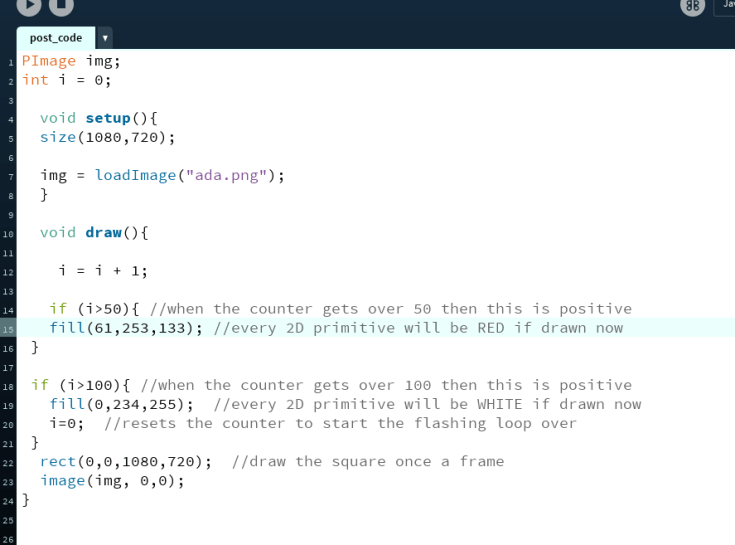
When I first tested my code the rectangle was over the poster so I rearranged some of the coding and got the rectangle behind the poster, Now when I tested my code the colours was red and white so I went onto Photoshop and got the colours I was using on there.
Here’s two screen shots of my poster working in processing, two screen shots will have different colours because they’re the colours I’m using. (pictures below in a slide show) but when the code in running they will change colour quicker.
I’m very happy with the idea of my poster and the ideas I’ve put into it, the poster tells different stories around it, you have Ada Lovelaces face, past computer, future processor, the brain and the light bulb.
I found a picture online of Ada Lovelace and Charles Babbage’s (picture below) and that gave me an idea for my poster, I got the picture (below) and cropped Charles out and put him in the poster and changed the colour to the main colour sauce in the poster.

This update to the poster is a lot better because it tells more of a story and has alot of history behind it. And I’ve now updated the picture in the coding program. (pictures below).
How did I come up with this idea?
We had a task to create something to do with Ada Lovelace it could of been a game,poster anything that’s to do with her, so I decided I wanted to do a poster, I was speaking to Matt about it and I wanted to do a poster to do with a processor (CPU) the computers brain and then Matt thought of an idea to do with a brain, he mentioned the old films ” b movies from the 1950’s” and then “The brain that wouldn’t die” and that made me think more so I searched about them and found posters which made me click and come up with the designs I’ve made now.
I’ve learnt a lot from doing all of this, I’ve gained more Photoshop editing skills, more research skills and better word press skills.
I’ve updated the poster a little bit, I’ve had more dots around the poster so when the colours in the program change colour they do too, (picture below)
![update]](https://adams2.home.blog/wp-content/uploads/2018/09/update.png?w=736)
Like this so there’s more flashing/changing colour when the code’s running.
And now the final poster that I’ve created just by talking to Matt about a couple of things and this is what I’ve made.

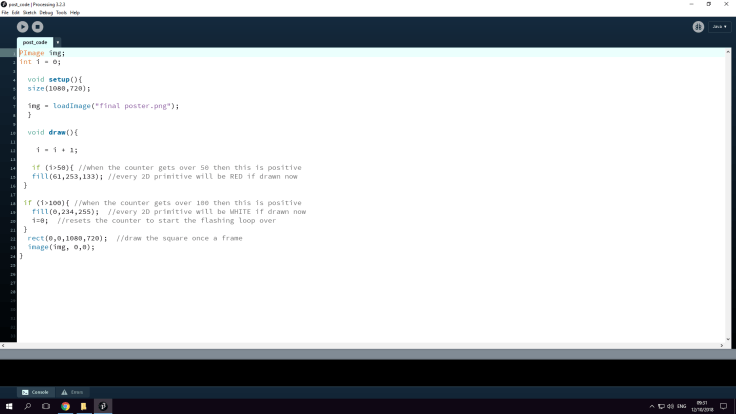
And this is the final code for anyone that wants to create something similar to this, hope it can help someone out. (picture below)
 Adams Blogs
Leave a comment